Google Search Console Data Studio Template: GSC Looker Studio Template
Unlock Powerful SEO Insights With Our Google Search Console Dashboard
This Premium SEO dashboard is built for SEOs who need granular insights they can actually use to grow traffic.
$119
One-time payment
Data Clare Google Search Console Data Studio Template Answers the Following Questions and More
- Is my organic search traffic growing or declining, and why?
- Which metrics are trending up versus spiraling down?
- What’s my overall search visibility across Google?
- Which search queries bring visitors?
- Which high-impression queries am I failing to capitalize on?
- What questions is my audience asking that I’m not answering?
- What content is earning clicks and what’s being ignored in search results?
- Which URLs have high impressions but terrible click-through rates?
- Is my best content slowly dying without me noticing?
- Which pages are losing rankings month over month?
- Where should I refresh content to recover lost traffic?
- Where do I actually rank for my most important keywords?
- Am I stuck on page 2 or fighting for the top 3?
- Which keywords are within striking distance of major traffic jumps?
- How many of my target keywords rank in positions 1-3, 4-10
- Do people search for my brand on Google
- How much of my organic traffic comes from people who already know me?
- Am I winning against competitors in non-branded searches?
What You Get on Our GSC Template for Data Studio (formerly Looker Studio)
A 7-page comprehensive dashboard to monitor, diagnose, and optimize your organic search performance.
Even better, the template is built for flexibility.
- Customize date ranges and comparisons to spot trends and anomalies instantly
- Filter by page, query, country, or device to analyze exactly what matters
- Schedule automated delivery to your inbox (or your client’s) so you never miss a shift.
1.) Overview
Get a complete snapshot of your search performance.
Monitor clicks, impressions, CTR, and average position at a glance.
Track trends over time, compare periods, and quickly identify what’s working and what is not.
2.) Query Analysis
See exactly which search terms drive traffic to your site.
Identify high-opportunity keywords where you rank well but get low clicks.
Discover search queries with massive impression volume that you’re underperforming on.
Find the golden questions your audience is asking so you can create content that captures that demand.
3.) Page Analysis
Evaluate how every page on your site performs in search.
See which URLs attract the most clicks, which have sky-high impressions but abysmal CTR, and which pages are your hidden gems.
Identify underperforming pages with high potential and prioritize your optimization efforts based on real impact.
4.) Decay Analysis
Monitor and catch declining pages and keywords before they tank your traffic.
Track which pages and keywords are losing impressions, clicks, or positions over time. Identify content that’s gone stale and needs an update.
Protect your traffic by refreshing high-value content at exactly the right moment, before your competitors outrank you.
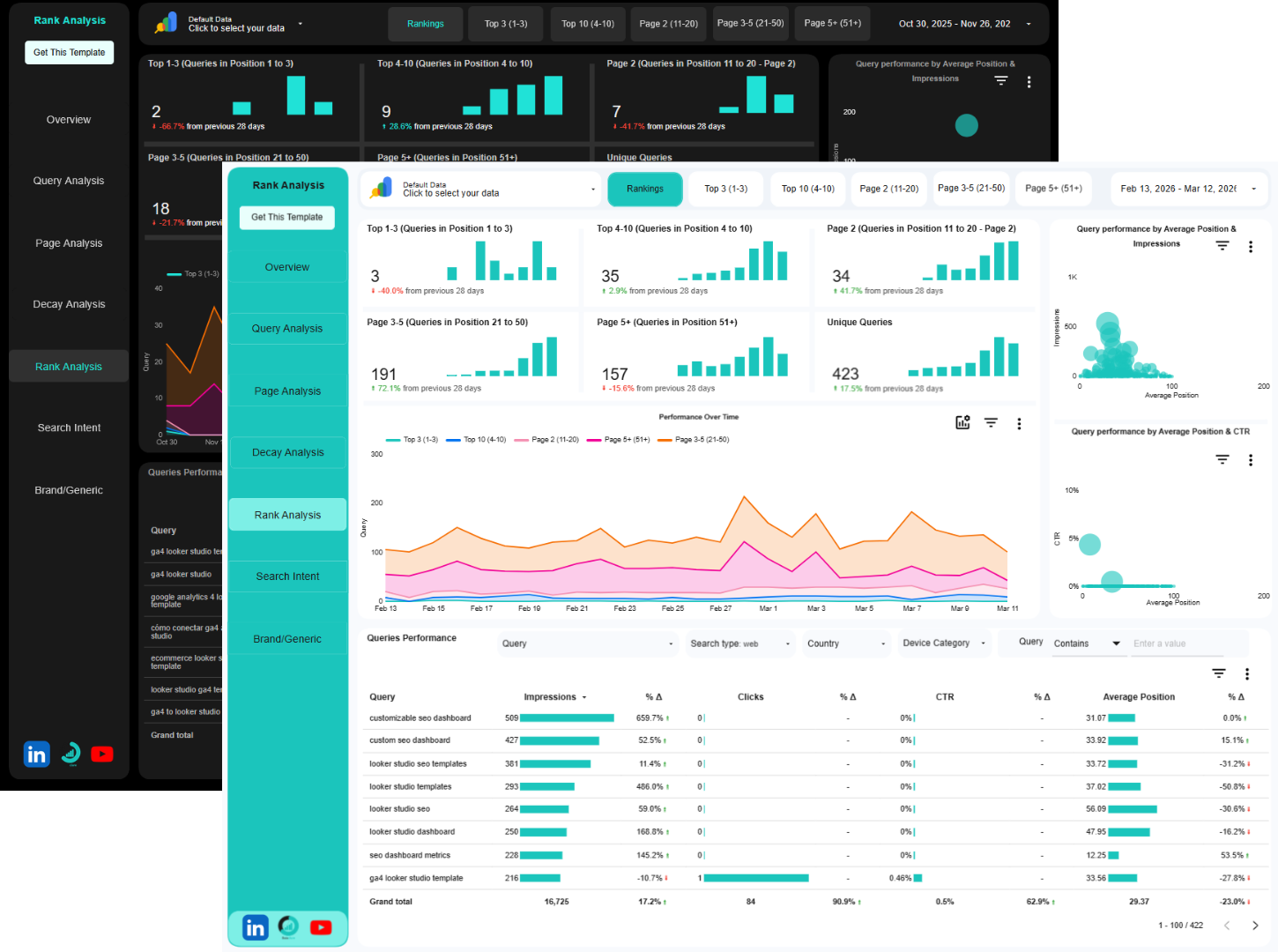
5.) Ranking Analysis
Know your exact position for every keyword that matters.
See how many queries rank in positions 1-3 (the money zone), 4-10 (page one), 11-20 (page two), and beyond.
Identify quick wins sitting just outside the top 10.
Track your ranking movements over time and measure the impact of your optimization efforts.
6.) Search Intent Analysis
Understand whether you’re ranking for informational, navigational, commercial, or transactional queries.
Align your content strategy with what actually moves the needle.
Identify pages that attract the wrong intent and need repositioning.
Stop wasting time creating content for browsers when you need buyers (or vice versa).
7.) Brand vs Generic Analysis
Separate branded traffic (people searching for you) from non-branded traffic (people discovering you).
Measure your true organic growth and competitive performance.
See if your SEO efforts are winning new customers or serving existing ones.
Prove to stakeholders that your organic strategy is also capturing demand, not only harvesting brand awareness.
Bonus
Break down performance by mobile, desktop, and tablet to identify device-specific opportunities.
Analyze which countries drive the most valuable traffic.
Spot geographic expansion opportunities or device experience issues.
Optimize your site experience for the devices and locations that matter most to your business.
Why This Matters
Make data-driven decisions in minutes, not hours: Stop exporting CSVs, building pivot tables, and trying to make sense of raw data.
Get instant answers to the questions that drive your SEO strategy.
Catch problems before they kill your traffic: See content decay, ranking drops, and CTR declines in real-time. Act proactively instead of reactively.
Protect the traffic and rankings you’ve worked hard to build.
Stop rebuilding reports. Plug in once, use forever: Connect your Google Search Console in minutes. The template automatically updates with fresh data. Never build another manual report again. Spend your time optimizing, not reporting.
We also have this template paired with GA4 and Google Ads and if that is what you want, you should check our collection of SEO Templates for Data Studio.
If you want something unique to your use case instead, request for a custom Search Console dashboard.
How it works
Buy the Google Search Console Data Studio Template
This will give you a copyable version of the template.
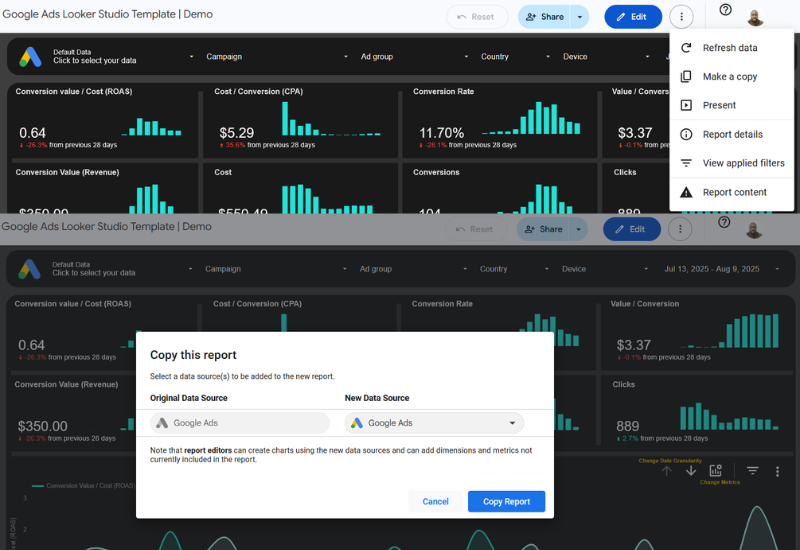
1. Make a copy
Click on the vertical 3-dotted menu at the top right corner of the dashboard. Then click on Make a Copy.
2. Add your Google Search Console
From the pop-up window under “New Data Source”, select your Google Search Console accounts and click on “Copy Report”.
3. Few seconds later
Wait for Data Studio to do its thing, the dashboard will be populated with insights from your Google Search Console data in less than a minute.
FAQs
Ready to upgrade your SEO reporting?
Invest in Data Clare Google Search Console Data Studio report template today and take back control of your organic search performance.