GA4 Source Group Dimension: Introduced To Clean-up Messy Traffic Source Data

One of the most frustrating aspects of GA4 acquisition reporting has finally been addressed.
The new Source Group dimension automatically consolidates multiple variations of the same traffic source into a single high-level category, making acquisition reporting significantly cleaner and easier to analyze.
Announced by Google on June 11, 2026, the feature is currently rolling out across GA4 properties.
At first glance, it may look like a small addition. In reality, it solves a reporting problem that marketers and analysts have been dealing with since the launch of GA4.
If you’ve ever opened a GA4 report and seen traffic from Facebook split across multiple source values such as:
- fb
- m.facebook.com
- mobile.facebook.com
- l.facebook.com
then you already understand the problem.
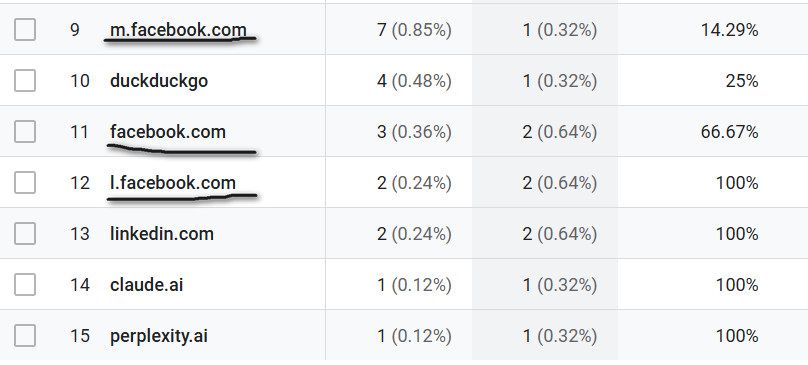
GA4 has always captured traffic sources with a high level of granularity. While accurate, this often resulted in fragmented reporting that required additional cleanup before meaningful analysis could happen.
The new Source Group dimension changes that.
What Is the Source Group Dimension?
Source Group is a new traffic-source dimension that standardizes and consolidates multiple variations of the same platform into a single reporting category.
Instead of showing every variation of a source separately, GA4 now groups them under a unified platform name.
For example:
| Source | Source Group |
|---|---|
| fb | |
| m.facebook.com | |
| mobile.facebook.com | |
| l.facebook.com |
The same logic applies to other major Social, eCommerce, and AI platforms.
This provides a cleaner view of acquisition data without sacrificing the underlying source-level detail.
The original Source dimension still exists for users who need granular analysis. Source Group simply adds a standardized layer on top of it.
GA4 Source Reporting Has Always Been Messy, This Fix It
For years, marketers have spent unnecessary time trying to answer simple questions such as:
- How much traffic came from Facebook?
- How much traffic came from Instagram?
- Which social platform drives the most conversions?
The challenge wasn’t that the data didn’t exist.
The challenge was that the same platform often appeared under multiple source values.
As a result, analysts frequently relied on:
- Regular expressions (Regex)
- CASE statements
- Calculated fields
- Custom Grouping
to consolidate traffic sources before reporting.
Source Group effectively brings that normalization directly into GA4.
Instead of creating custom logic to combine Facebook variations, marketers can simply use the new dimension and get the answer immediately.
For agencies and in-house marketing teams alike, this means less time cleaning data and more time analyzing performance.
Source Group vs Source Platform
Alongside the introduction of Source Group, Google has also updated the existing Source Platform dimension.
Although the two dimensions sound similar, they serve different purposes.
Source Group
Source Group identifies the platform that generated the traffic.
Examples:
| Source | Source Group |
|---|---|
| ig | |
| instagram.com |
Both paid and organic traffic are combined under the same platform grouping.
Source Platform
Source Platform identifies the platform where you manage buying activity.
For example:
| Source | Medium | Source Group | Source Platform |
|---|---|---|---|
| paid_social | Meta Ads | ||
| ig | cpc | Meta Ads | |
| paid | Meta Ads |
In this scenario:
- Source Group answers: “Which platform generated the traffic?”
- Source Platform answers: “Which advertising platform delivered the ad?”
This creates a much cleaner distinction between traffic origin and advertising platform attribution.
A useful way to think about it is this:
If traffic comes from Instagram, Source Group tells you it came from Instagram.
If that Instagram traffic was generated through advertising, Source Platform tells you the ad platform was Meta Ads.
This new structure aligns acquisition reporting more closely with how marketers actually analyze traffic and advertising performance.
Unlike the AI Assistant Channel Group, This Works Retroactively
One of the biggest limitations of the recently introduced AI Assistant default channel group is that it primarily took into consideration only newly processed data.
Source Group is different.
Google has confirmed that the new dimension is applied retroactively, meaning historical data can benefit from the new grouping logic rather than requiring organizations to wait for new traffic to accumulate.
For analysts, this is arguably one of the most valuable aspects of the update.
Instead of maintaining multiple versions of source-grouping logic, organizations can immediately start analyzing existing data through the new official standardized dimension.
This is particularly important for agencies and businesses that want to compare performance over longer periods without rebuilding historical reports or creating custom workarounds.
Don’t See Source Group Yet? You’re Not Alone
If you cannot find the Source Group dimension in your GA4 property yet, don’t panic.
Although Google announced the feature on June 11, 2026, the rollout is still in progress and has not reached every property.
As with many GA4 updates, Google is gradually deploying the feature across properties.
This means some users can already access Source Group in their reports and explorations, while others may need to wait a little longer before the dimension becomes available.
The good news is that once it arrives in your property, the grouping logic will work retroactively on historical data. You won’t need to wait weeks or months to start benefiting from cleaner source reporting.
So if Source Group isn’t showing up in your reports yet, that’s expected. Keep an eye on your available dimensions over the coming days and weeks as the rollout continues.
Why We Like This Update at Data Clare
At Data Clare, we’ve frequently used calculated fields, custom source grouping logic, or regex-based transformations inside Data Studio to provide clients with cleaner acquisition reporting.
The approach worked, but it required additional configuration and extra processing within reports.
Whether it was Facebook, Instagram, LinkedIn, Amazon, or emerging AI traffic sources, we often had to build custom logic to consolidate multiple source variations into a single reporting category.
The introduction of Source Group means those insights can now be accessed directly from GA4.
That leads to:
- Cleaner reporting setups
- Faster dashboard development
- Improved dashboard performance
It allows analysts to spend less time cleaning data and more time interpreting it.
For us, that’s one of the most valuable aspects of this release.
Final Thoughts
The Source Group dimension may not be as headline-grabbing as some of Google’s AI-related announcements, but for anyone working with GA4 acquisition reporting, it is a huge improvement.
By automatically consolidating source variations into standardized platform names, Google is removing a significant amount of manual reporting work that agencies, marketers, and analysts have carried for years.
Whether you’re analyzing Facebook traffic, Instagram campaigns, AI assistant referrals, Amazon traffic, or any other major platform, the new dimension makes it significantly easier to understand performance without creating custom reporting logic.
For many organizations, this means fewer regex formulas, fewer calculated fields, cleaner reports, and faster answers to everyday marketing questions.


A Data Studio expert that help e-commerce and marketing teams transform their business data into an actionable Data Studio dashboard that cuts hours of manual reporting and delivers real-time business insights.