GA4 AI Assistant Channel: What It Is and How It Works

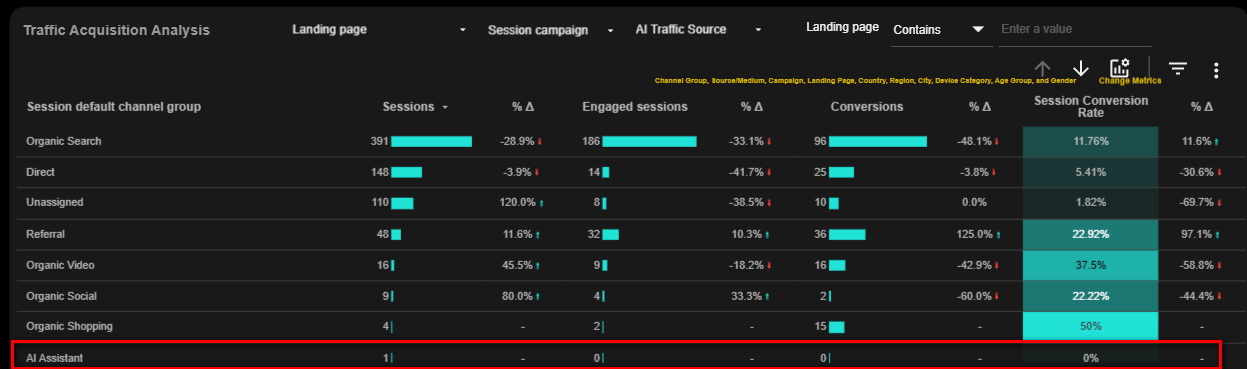
Google Analytics 4 has officially introduced a dedicated AI Assistant default channel group, making it easier than ever to track AI traffic from platforms such as ChatGPT, Gemini, Claude, Perplexity, and other recognized AI assistants.
The update was announced by Google on May 13 and automatically classifies qualifying AI assistant traffic into its own channel within GA4’s Default Channel Group reports. No setup, custom definitions, or regex patterns are required.
For marketers, agencies, and analysts who have spent months building custom channel groups just to measure AI-driven visits, this is a welcome change.
However, there are a few important limitations and reporting considerations you should understand before retiring your existing AI traffic tracking setup.
How AI Assistant Traffic Is Now Classified in GA4
When GA4 recognizes traffic from a supported AI assistant, it now automatically assigns:
- Default Channel Group: AI Assistant
- Medium: ai-assistant
- Campaign: (ai-assistant)
This means AI-generated referrals are no longer grouped under the generic Referral channel when a recognized AI assistant referrer is detected.
Previously, most marketers had to rely on:
- Custom channel groups
- Regex-based source matching
- Data Studio calculated field
- Manual reporting workarounds
to isolate traffic from platforms such as ChatGPT, Claude, Gemini, and Perplexity.
With this update, Google is effectively acknowledging AI assistants as a distinct acquisition channel, similar to Organic Search, Paid Search, Social, and Referral.
No Setup or Configuration Required
One of the biggest advantages of this update is that it is completely automatic.
There is no setting to enable, no custom channel group to create, and no configuration required inside GA4.
Once the rollout reaches your property, eligible AI assistant traffic will begin appearing in the new AI Assistant channel automatically.
Why You May Not See the New Channel Yet
Although Google announced the update on May 13, the rollout did not reach every GA4 property at the same time.
Many marketers have already reported seeing the AI Assistant channel in their Traffic Acquisition reports, while others still do not have access to it yet.
The feature is being released gradually across Google Analytics properties. If you don’t see the AI Assistant channel in your reports today, that does not necessarily mean something is wrong with your setup.
The rollout is still ongoing and has accelerated significantly over the past few days, so you may begin seeing the new channel in your property soon.
Historical AI Traffic Won’t Be Reclassified
This is one of the most important things to understand.
Before the introduction of the AI Assistant channel, AI-generated traffic was typically classified as Referral traffic whenever a referrer was available.
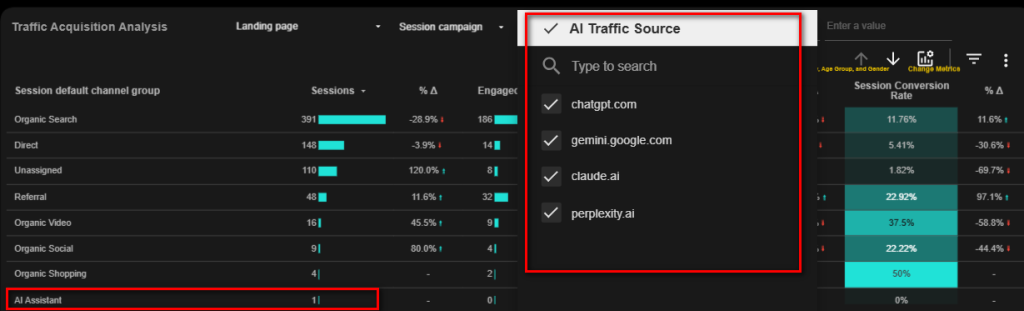
As a result, your historical AI traffic remains inside the Referral channel (or Direct in some cases).
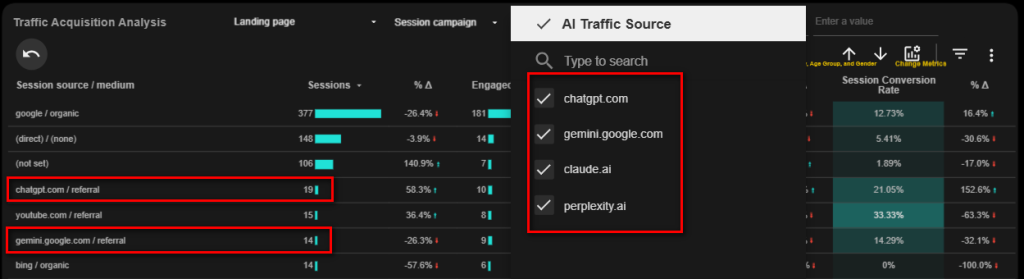
Google is not retroactively reprocessing historical sessions into the new AI Assistant channel. The channel only starts collecting data from the point the feature becomes available in your property.
This means:
- Historical AI traffic remains in Referral or Direct.
- New AI Assistant data begins only after rollout.
- Period-over-period comparisons may require special handling.
- Historical trend analysis may still depend on custom AI tracking methods.
Currently Limited to Session-Based Acquisition Reports
At the time of writing, based on observations across multiple GA4 properties, this new classification applies to session traffic-source dimensions, including:
- Default Channel Group
- Medium
- Campaign
This means the update is primarily visible in session-based acquisition reporting such as the Traffic Acquisition report.
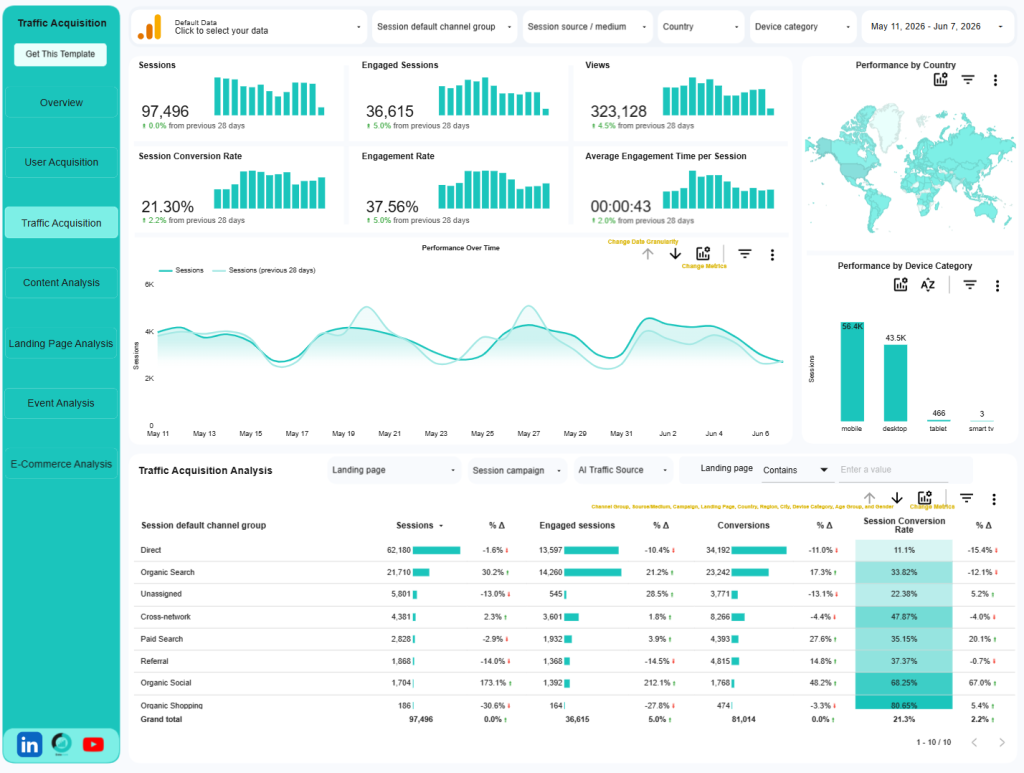
The AI Assistant channel is currently not appearing as a dedicated channel within the User Acquisition report.
Whether Google extends this classification to user-scoped acquisition dimensions in the future remains unknown.
Why Some AI Visits Still Show Up as Direct Traffic
The new channel is a major improvement, but it does not solve every AI attribution challenge.
GA4 can only classify AI Assistant traffic when it receives a recognizable referrer from a supported AI platform.
If a user arrives without a referrer header, the session may still be attributed to Direct traffic rather than AI Assistant.
This can happen when:
- Mobile apps strip referrer information.
- In-app browsers remove referral data.
- Users copy and paste links manually.
- Certain AI platforms do not pass referral information correctly.
As a result, some AI-driven visits may continue to appear under Direct traffic.
What This Means for Data Clare Templates
The new AI Assistant channel is an excellent step forward and will eventually eliminate much of the manual work required to track AI-generated traffic.
However, Data Clare will not be removing the existing AI Traffic filters from our GA4 Data Studio report templates just yet.
There are several reasons for this decision:
1. The Rollout Is Still In Progress
Many GA4 properties still do not have access to the AI Assistant channel.
Removing our AI tracking logic now would create issues with AI traffic reporting across different users and properties.
2. There Is No Historical Backfill
The native channel starts collecting data only after rollout.
Our existing AI traffic filters continue to provide continuity for historical analysis and trend reporting.
3. Existing Reports Need Consistent Historical Comparisons
Many businesses want to understand how AI traffic has evolved over time.
Because historical AI sessions remain categorized as Referral or Direct, custom AI tracking still plays an important role in bridging that reporting gap.
Will Data Clare Eventually Replace Its Custom AI Traffic Filter?
Yes.
Once the rollout is fully available across GA4 properties and sufficient data has accumulated in the native AI Assistant channel, we will transition our templates toward Google’s native classification.
The native channel is easier to maintain, requires no custom configuration, and will become the reporting standard for AI-driven traffic analysis moving forward.
Until then, Data Clare’s AI Traffic filters remain the most practical solution for maintaining reporting consistency and historical visibility.
Final Thoughts
The introduction of the AI Assistant default channel group is one of the most significant GA4 acquisition reporting updates in recent years.
For the first time, Google is treating AI assistants as a dedicated traffic source rather than lumping them into Referral traffic.
While the rollout is still ongoing and the feature has limitations, particularly around historical data and Direct traffic attribution, it represents an important step toward better measurement of AI-driven website visits.
For marketers looking to track AI traffic in GA4, the new AI Assistant channel provides a standardized way to measure visits from supported AI platforms without relying on custom channel groups or regex-based filters.
If your property has not received the update yet, no action is required. The rollout is automatic, and the new channel will begin populating once it becomes available in your account.
In the meantime, maintaining your existing AI traffic tracking setup remains the best way to ensure complete and consistent reporting.

A Data Studio expert that help e-commerce and marketing teams transform their business data into an actionable Data Studio dashboard that cuts hours of manual reporting and delivers real-time business insights.