Blended GA4 + Search Console Data Studio Template
See Complete View of Performance from Impressions to Conversions
A powerful Data Studio dashboard that blends Google Analytics 4 and Google Search Console, giving you a complete view of how every page, country, and device performs from impressions → clicks → conversions, all in one place.
$149
One-time payment
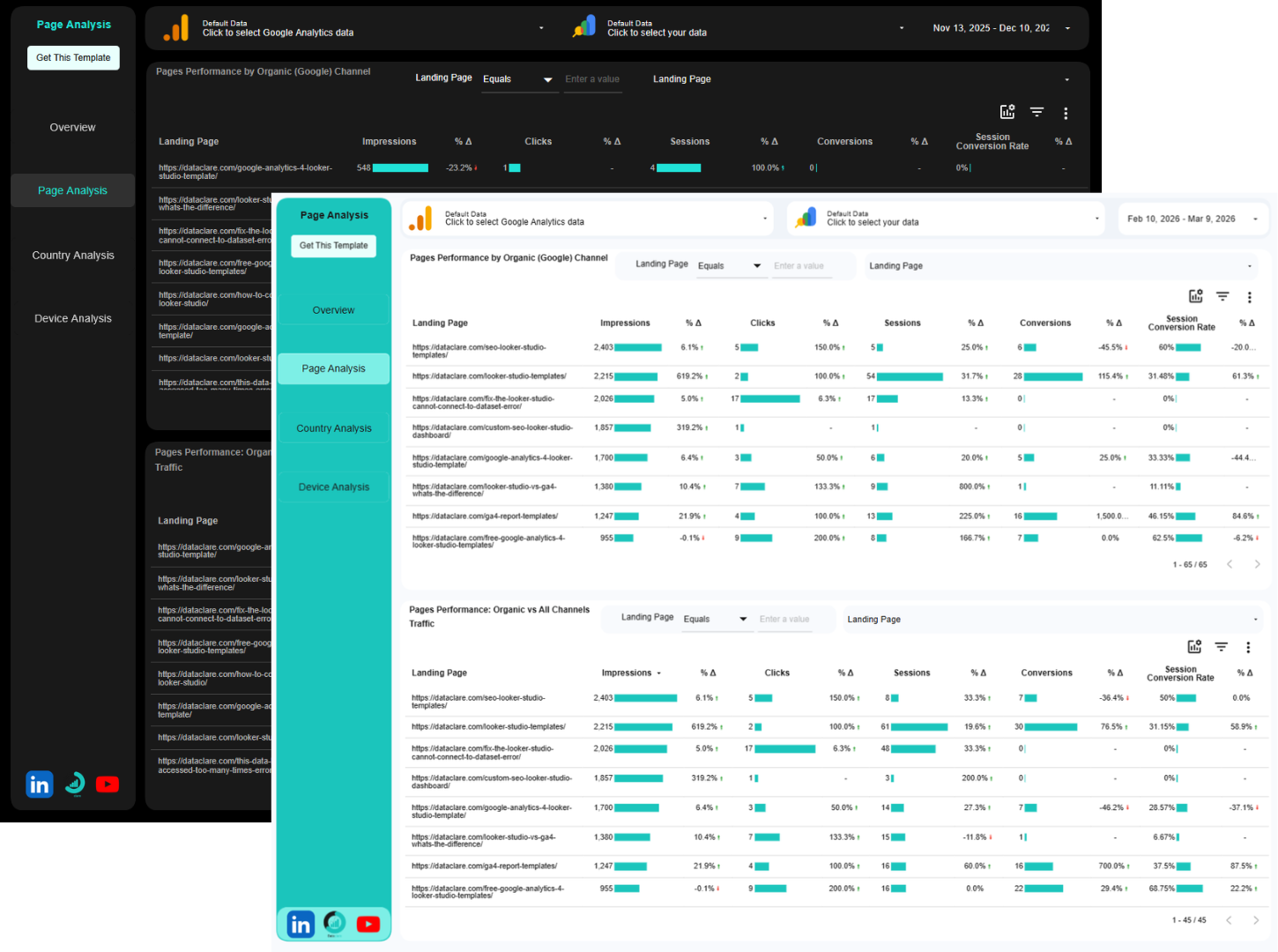
Our Blended GA4 + Search Console Data Studio Template Answers the following Questions and more
Which of my pages are actually performing?
See every page’s complete performance from search impressions to conversions. Compare organic search performance against all your channels combined. Instantly spot your winners and your underperformers.
Where is my traffic really coming from?
Break down performance by country. Discover which geographic markets deliver the best results for organic search vs. all channels. Find untapped opportunities you didn’t know existed.
Are mobile users converting as well as desktop?
Compare how mobile, desktop, and tablet users perform across every metric. See if device experience is costing you conversions. Know exactly where to focus your optimization efforts.
How does organic search compare to everything else?
Every view shows organic channel performance separately, then all channels together. See your organic search performance clearly. Understand how it fits into your overall marketing mix.
Is my performance getting better or worse?
Built-in period comparisons show you exactly how metrics are trending. See growth or decline at a glance. No more manual calculations or spreadsheet gymnastics.
Where should I actually focus my time?
Stop guessing. The data tells you which pages need optimization, which countries to target, and which devices need attention. Make decisions based on revenue impact, not hunches.
How this Template makes your Job Easier
- Stop Wasting Time on Manual Reporting: Instead of spending hours copying data between platforms and building reports from scratch, get instant access to a professionally designed dashboard that updates automatically. Your reporting time drops from hours to minutes.
- Make Confident Decisions Faster: When you can see the complete journey from search impression to purchase in one view, you immediately spot what’s working and what’s not. No more guessing or relying on incomplete data, just clear insights that drive action.
- Prove Your Marketing ROI Effortlessly: Show stakeholders exactly how organic search (and other channels) contribute to bottom-line results. The built-in comparison features make it easy to demonstrate growth and justify marketing investments.
- Identify Problems Before They Cost You Money: High impressions but low clicks? Great traffic but poor conversions? This dashboard surfaces issues at every stage of the funnel so you can fix problems before they impact revenue.
- Optimize with Surgical Precision: Instead of broad, one-size-fits-all optimization strategies, see exactly which pages, countries, and devices need attention. Focus your efforts where they’ll have the biggest impact.
- Scale Your Reporting Without Scaling Your Workload: Whether you’re managing one website or dozens of clients, this template duplicates in seconds. Deliver professional, comprehensive reports without rebuilding from scratch each time.
- Speak the Language of Revenue, Not Just Traffic: Move beyond vanity metrics like page views and bounce rates. Connect your marketing efforts directly to conversions and revenue, the metrics that actually matter to your business or clients.
If you don’t want a blended version, you can get a version where GA4 and Search Console have their own sections. Check our GA4 + Search Console Data Studio Template.
How it works
Buy the Blended GA4 and Search Console Data Studio Template
This will give you a copyable version of the template.
1. Make a copy
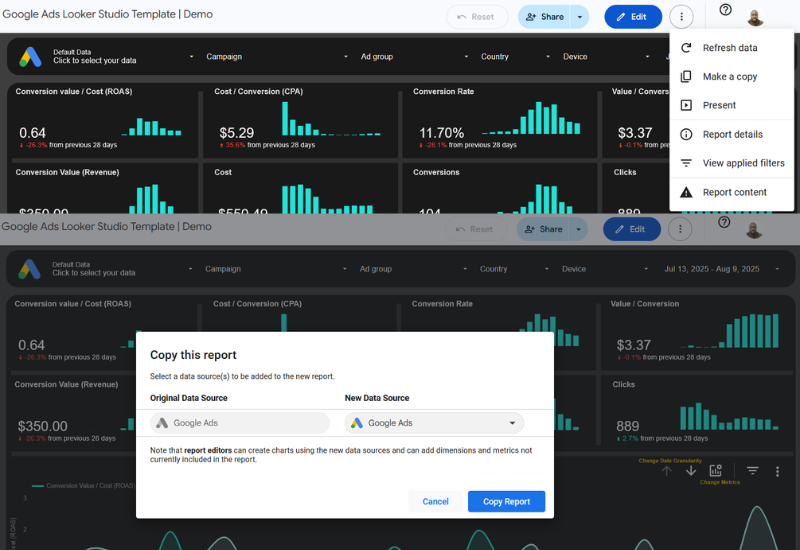
Click on the vertical 3-dotted menu at the top right corner of the dashboard. Then click on Make a Copy.
2. Add your data sources
From the pop-up window under “New Data Source”, select your accounts and click on “Copy Report”.
3. Few seconds later
Wait for Data Studio to do its thing, the dashboard will be populated with insights from your GA4 and Search Console data in less than a minute.
FAQs
Ready to Transform Your Analytics?
Invest in this dashboard today and get complete visibility into your search-to-conversion performance. Simply connect your GA4 and GSC accounts, and you’ll have a powerful decision-making dashboard in minutes.