Blended Search Console + Google Ads Data Studio Template
Your Complete Search Performance in One View (Organic + Paid)
The Data Studio dashboard that connects Google Search Console and Google Ads into one complete picture. Track every search term/query from the moment someone types it into Google to the moment they convert, whether they clicked your organic listing, your ad, or both.
$149
One-time payment
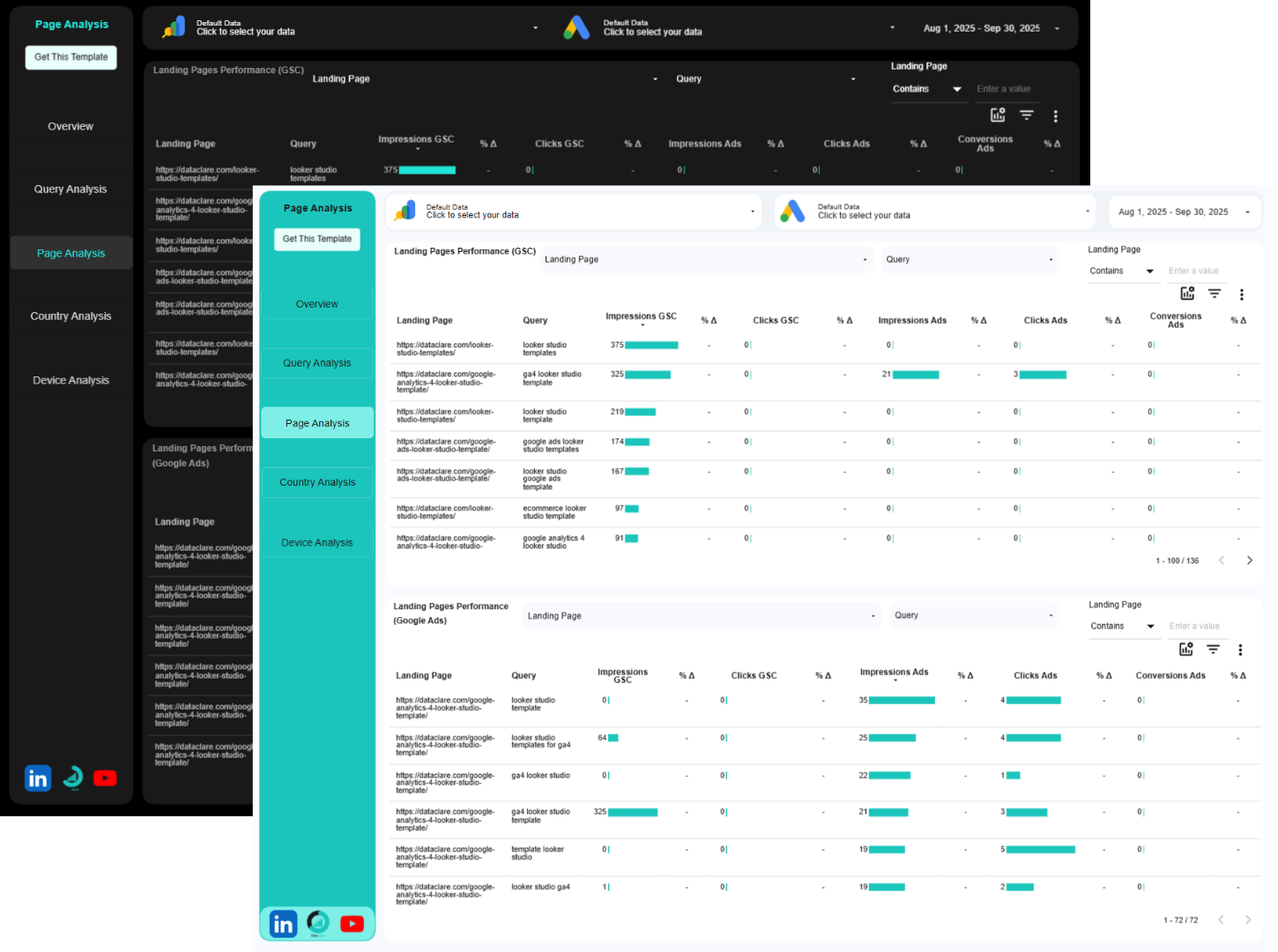
Our Blended Search Console + Google Ads Data Studio Template Answers the Following Questions and More
Am I wasting money on ads for keywords I already rank for?
See which search terms (query) you’re paying for that you already own organically.
View organic and paid performance for the same queries side-by-side.
Stop throwing money at Google when you’re already winning those clicks for free.
Which keywords should I bid on vs. optimize organically?
Compare how every search term performs from search impressions through to conversions.
See which queries convert better from paid versus organic.
Know exactly where to spend your ad budget and where SEO will deliver better ROI.
Is my paid search actually helping or just cannibalizing organic traffic?
Watch what happens to your total clicks and conversions when paid and organic appear together.
See if your ads are adding new customers or just costing you money for traffic you’d get anyway.
Optimize your strategy to maximize total search presence without redundant spend.
Where are the gaps in my search coverage?
Find searches where you’re ranking but not running ads, or running ads but not ranking organically.
Discover exactly where you need to strengthen your presence. Which pages and queries deserve my ad spend?
Track which landing pages and queries convert visitors.
Send your ad budget to pages and keywords that actually turn clicks into customers.
What’s my actual return from search marketing?
Stop looking at organic and paid as separate worlds.
Connect your search efforts directly to conversions and revenue across both channels.
Understand the true ROI of your complete search strategy and make decisions based on actual conversion data, not assumptions.
How this Template makes your Job Easier
- Stop Jumping Between Platforms and Wasting Hours: Instead of logging into Search Console, then Google Ads, then trying to match up query data in messy spreadsheets, get instant access to a professionally designed dashboard that connects both data sources automatically. What used to take an hour now takes three minutes.
- Stop Wasting Ad Budget on Bad Guesses: When you can see exactly which keywords you already own and which ones are converting, you stop hemorrhaging money on unnecessary ads. Instantly identify which keywords deserve more investment and which are wasting your budget. No more flying blind with your paid search.
- Catch Expensive Mistakes Before They Blow Your Budget: Paying for clicks on terms you rank #1 for organically? Great paid traffic but poor conversion rates? This dashboard surfaces wasteful spending at every stage, whether it’s ad-to-organic cannibalization or high-cost keywords that don’t convert, so you can reallocate budget before it costs you thousands.
- Stop Using Cookie-Cutter Search Strategies: Instead of broad strategies that treat all keywords the same, see exactly which queries need paid support, which should focus on organic optimization, and which need to be killed entirely. Focus your budget and effort where the data says it’ll actually pay off.
- Manage More Accounts Without Losing Your Mind: Whether you’re managing one website or dozens of clients, this template duplicates in seconds. Deliver sharp, professional, comprehensive search reports without rebuilding from scratch each time or staying up past midnight.
- Talk About Money, Not Just Metrics: Move beyond just talking about metrics like impressions, click-through rates, and average position. Show conversions. Show revenue. Show actual business results from your search strategy. Speak the language that gets budgets approved and keeps clients happy.
If you don’t want a blended version, you can get a version where Google Ads and Search Console have their own sections. Check our Google Ads + Search Console Data Studio Template.
How it works
Buy the Blended Search Console + Google Ads Data Studio Template
This will give you a copyable version of the template.
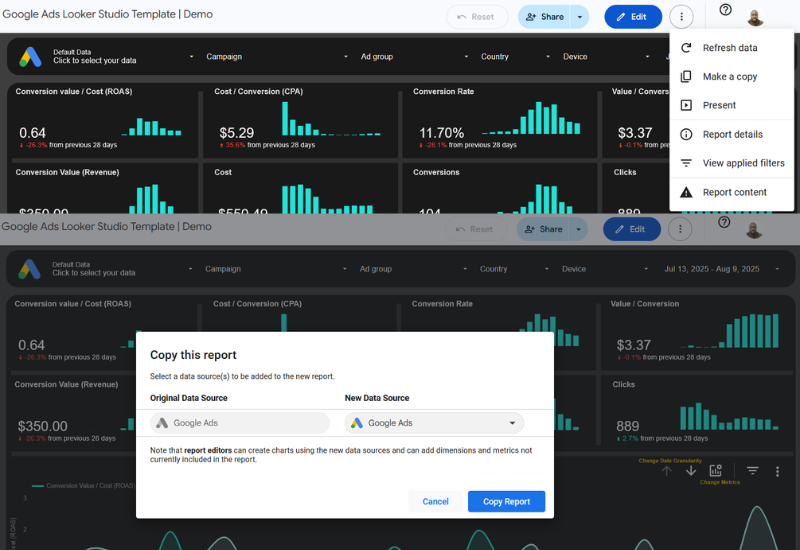
1. Make a copy
Click on the vertical 3-dotted menu at the top right corner of the dashboard. Then click on Make a Copy.
2. Add your data sources
From the pop-up window under “New Data Source”, select your accounts and click on “Copy Report”.
3. Few seconds later
Wait for Data Studio to do its thing, the dashboard will be populated with insights from your Google Ads and Search Console data in less than a minute.
FAQs
Ready to Transform Your Search Performance?
Invest in this dashboard today and get complete visibility into your search-to-conversion performance. Simply connect your Google Ads and Search Console accounts, and you’ll have a powerful decision-making dashboard in minutes.